

How to Add an llms.txt File to Your Website
A website can have strong content and still be difficult for AI tools to scan. Navigation, scripts, duplicate sections, and low-value pages can bury the resources that matter most. An llms.txt file helps solve that by presenting your priority content in a simple text format.
The goal is not to list every page on your site. The goal is to show AI systems which pages are most useful, current, and authoritative. This guide explains what to include, how to format the file, and where to upload it.
How Do You Add an llms.txt File to Your Website?
To add an llms.txt file, create a plain-text file named llms.txt, list your most important pages and a short site description in Markdown, and upload it to your domain root so it loads at yoursite.com/llms.txt. It guides AI crawlers to your best content.
The llms.txt proposal was published by Jeremy Howard on September 3, 2024, as a way to provide information that helps large language models use a website at inference time. The proposal describes /llms.txt as a Markdown file that can include brief background information, guidance, and links to detailed Markdown resources. (Source: llms.txt, 2024)
An llms.txt file is simple to create, but it still needs editorial judgment. The goal is not to list every URL. The goal is to make your most useful content obvious to AI tools.
What Is an llms.txt File Designed to Do?
An llms.txt file is designed to give large language models a curated, plain-text guide to a website’s most important content. It is a guidance file for AI tools, not a search ranking tag, access-control rule, or replacement for a sitemap.
| File | What it does (as stated in this guide) |
|---|---|
| llms.txt | A guidance file that gives AI tools a curated, plain-text map to a site’s most important content. |
| robots.txt | Manages crawler access rules — tells crawlers what they may or may not access. |
| XML sitemap | Can list every indexable URL; llms.txt instead points AI tools to the pages that best represent the site. |
A large language model is an AI system that can process and generate natural language from text patterns. Google Cloud defines LLMs as statistical language models trained on massive amounts of data that can generate and translate text and perform natural language processing tasks. (Source: Google Cloud, 2026)
Websites are often difficult for AI tools to interpret cleanly because pages include navigation, scripts, styling, ads, repeated blocks, and duplicate templates. An llms.txt file reduces that noise by presenting a concise content map in Markdown.
An llms.txt file is strongest when it sits beside normal SEO assets. It should support crawlability, internal linking, structured data, and strong content rather than replace them.
What Information Should You Include in llms.txt?
You should include a short site description, key brand information, priority pages, documentation, service pages, product pages, and proof assets. The file should help an AI system understand what the site is, what it offers, and which URLs provide the strongest source material.
| Include | Leave out |
|---|---|
| Short site description and core brand info | Thin archives and duplicate tag pages |
| Priority pages, service and product pages | Private or login-gated URLs |
| Documentation and support resources | Outdated or low-value posts |
| Proof assets (case studies, original research) | Broken or redirected URLs |
A useful llms.txt file is selective because AI tools need guidance, not a duplicate of your full sitemap. The best file works like a curated index that separates official brand pages, commercial pages, educational resources, and support materials.
The original Answer.AI post says the file can include an H1, a blockquote summary, optional extra context, and H2 sections with Markdown lists of links. This gives site owners a simple structure for explaining what each linked page contains. (Source: Answer.AI, 2024)
Site Description and Core Information
The site description should define the brand in one or two clear sentences. It should tell an AI system who the site belongs to, what the site covers, and which audience the content serves.
A strong opening section should include the official brand name, domain, main service categories, and primary audience. This context helps AI tools interpret the links that follow.
Include these core items:
- Site name
- Official domain
- Short brand description
- Main services or products
- Primary audience
- Location or service area where relevant
- Official contact or About page
Priority Pages and Supporting Resources
Priority pages are the URLs that best explain your company, products, services, expertise, proof, and support resources. These pages should be listed with short descriptions so an AI tool can understand the purpose of each link before visiting it.
The file should include pages that help AI systems answer buyer, user, and researcher questions. A product page, pricing page, case study, documentation hub, and original research page can each serve a different source purpose.
Do not include weak pages for volume. Thin archives, duplicate tag pages, private pages, and outdated posts reduce the usefulness of the file.
How Should You Format an llms.txt File?
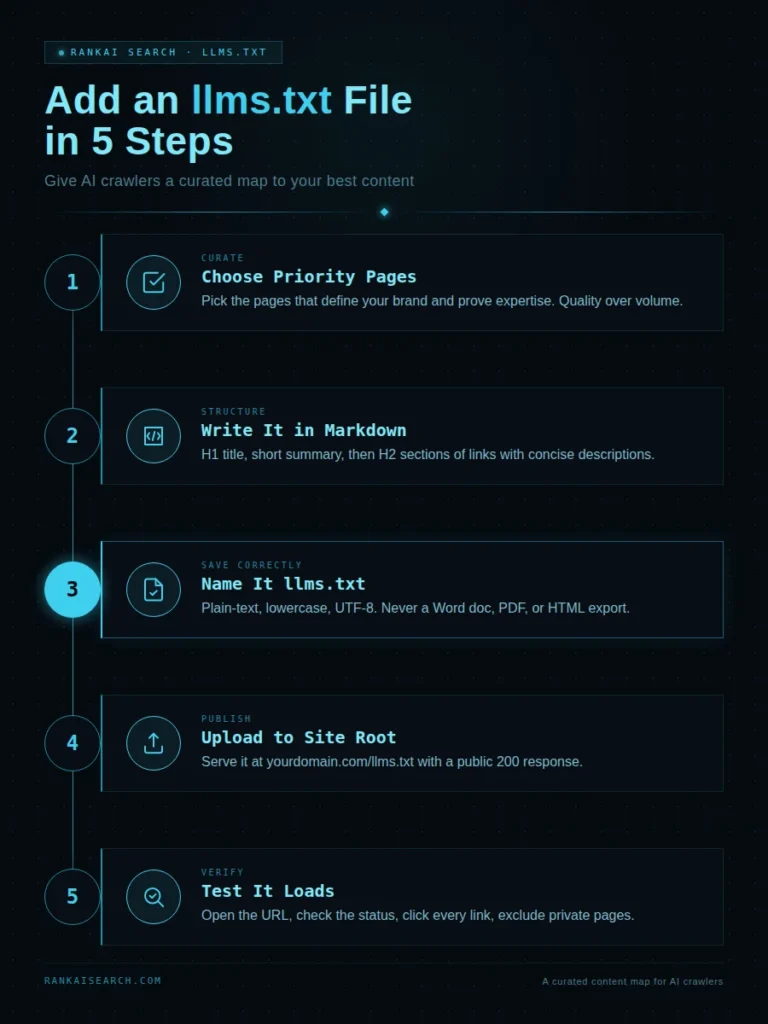
An llms.txt file should be formatted as plain Markdown with a clear H1 title, a short summary, organized H2 sections, and Markdown links with concise descriptions. The file should be easy for humans to read and easy for AI systems to parse.
The AnswerDotAI GitHub repository describes the file structure as a Markdown document with an H1 name, optional blockquote summary, optional details, and H2 sections containing file lists. It also notes that the file is designed to be readable by humans and precise enough for programmatic processing. (Source: AnswerDotAI GitHub, 2024)
Formatting matters because AI tools should not need to infer structure from a messy text dump. Clear headings and link descriptions turn the file into a useful AI-facing guide.
Use this basic structure:
| # Example Brand> Example Brand provides software and services for B2B teams that need clear AI-ready documentation.## Core Pages- [Homepage](https://example.com/): Official homepage and brand overview.- [About](https://example.com/about/): Company background, leadership, and positioning.- [Services](https://example.com/services/): Main service categories and use cases.## Guides- [AI Search Guide](https://example.com/ai-search-guide/): Explains how brands can improve AI search visibility.- [Structured Data Guide](https://example.com/schema-guide/): Covers schema markup for brand and content clarity.## Contact- [Contact](https://example.com/contact/): Official contact page for business inquiries. |
How Do You Create the File Correctly?
You create the file correctly by saving a plain-text Markdown document with the exact name llms.txt. The file should not be a Word document, PDF, HTML page, or rich-text export.
The technical details matter because a small naming or upload error can make the file unavailable. A file named llms.txt.txt, hidden behind a login, blocked by security rules, or placed in the wrong folder will not serve its purpose.
Yoast’s functional specification states that enabling its llms.txt feature creates an llms.txt file in the root directory of a website and updates it weekly through a scheduled action. (Source: Yoast Developer Docs, 2026)
File Name and Plain-Text Format
The file name must be exactly llms.txt. The file should load as plain text in a browser and use standard Markdown syntax.
Use a simple text editor, code editor, CMS feature, plugin, or static-site file system. Avoid rich text tools that add hidden formatting.
File creation rules:
- Use lowercase file name
- Use .txt extension
- Save as UTF-8 where possible
- Keep the file public
- Avoid HTML-only formatting
- Avoid scripts or tracking code
- Keep descriptions short and factual
Markdown Structure and Link Formatting
Markdown structure makes the file readable and predictable. Each listed URL should include a page title and a short description.
Use this link pattern:
- Page Title: Short description of what the page covers.
A useful description explains the page’s role. “Services” is weak, while “Core consulting services for AEO, GEO, AIO, LLMO, and SEO” is clearer.
Strong descriptions identify:
- Topic
- Audience
- Use case
- Service or product
- Evidence type
- Official source status
Where Should You Upload llms.txt?
You should upload llms.txt to the root directory of your website so it loads at https://yourdomain.com/llms.txt. The root location gives AI tools a predictable place to look for the file.
Mintlify describes llms.txt as a documentation index that can be fetched at a /llms.txt URL and used to discover available pages before exploring further. This reflects the practical value of a consistent root or documentation-level location. (Source: Mintlify Docs, 2026)
A root-level file is easier to discover than a file stored in a media library, theme folder, or internal asset directory. If your CMS cannot serve root files directly, a developer may need to create a route, proxy, or deployment rule.
The final URL should return a 200 status code. A redirect can still work, but a direct root-level response is cleaner and easier to test.
How Do You Add llms.txt to Different Website Platforms?
You add llms.txt to different platforms by using the method that controls public root-level files. WordPress, static sites, hosted CMS platforms, and custom sites each handle that root access differently.
The platform matters because not every editor has direct server access. Some sites need a plugin, some need a developer deployment, and some documentation systems can generate the file automatically.
X’s developer documentation uses llms.txt as a structured index of documentation pages and llms-full.txt as a full documentation file for more complete context. This shows how documentation platforms can offer both a curated index and a larger source file. (Source: X Developer Platform, 2026)
WordPress Websites
A WordPress website can add llms.txt through an SEO plugin, a dedicated plugin, a hosting file manager, SFTP, or a custom route. The key requirement is that the final file loads at the root URL.
WordPress sites often require extra care because uploading a file to the media library does not normally place it at /llms.txt. A developer or plugin may be needed when the hosting setup blocks root-file uploads.
Common WordPress methods include:
- Yoast SEO llms.txt feature
- Dedicated llms.txt plugin
- Hosting file manager upload
- SFTP upload
- Custom rewrite rule
- Server-level static file
Custom and Hosted Websites
Custom and hosted websites should add llms.txt through the deployment workflow that controls public files. A static site usually needs the file placed in the public directory before deployment.
Hosted CMS platforms may limit root file control. In that case, the solution may involve a reverse proxy, edge rule, app, plugin, or developer-managed route.
The file should be included in version control when a site uses deployments. Manual uploads can disappear after a rebuild if they are not part of the source project.
How Can You Test Whether the File Is Working?
You can test whether llms.txt is working by opening https://yourdomain.com/llms.txt in a browser and confirming that it loads publicly as plain text. A working file should be accessible, readable, correctly formatted, and linked to live pages.
Testing should check the file itself and the pages listed inside it. A file can technically load while still pointing AI tools to redirected, outdated, blocked, or low-value URLs.
Google’s robots.txt documentation explains that robots.txt manages crawler access, which is a separate function from content guidance. This distinction matters because a publicly accessible llms.txt file can still be less useful if important linked pages are blocked elsewhere. (Source: Google Search Central, 2026)
Run these checks after publishing:
- Open the public URL
- Confirm the exact file name
- Check the HTTP status
- Click every listed link
- Confirm no private URLs are included
- Review page descriptions
- Retest after deployments
- Check server logs where available
How Should You Choose Which Pages to Include?
You should choose pages that best define your brand, explain your products or services, prove your expertise, and answer high-value user questions. The file should prioritize quality and usefulness over URL volume.
An llms.txt file is not an XML sitemap. A sitemap can list every indexable URL, while llms.txt should guide AI tools toward the pages that best represent the site.
Search Engine Land described llms.txt as a proposed standard that gives site owners a way to package content guidance for AI systems. This framing supports a curated approach rather than a full crawl list. (Source: Search Engine Land, 2025)
Use these selection questions:
- Does the page define the brand?
- Does the page explain a priority offer?
- Does the page provide original evidence?
- Does the page answer a buyer question?
- Does the page support entity clarity?
- Does the page stay current?
- Does the page deserve AI attention?
A short file with strong pages is better than a long file with weak pages. AI tools need a clean signal, not a second navigation menu.
How Often Should You Update Your llms.txt File?
You should update your llms.txt file whenever important content changes and review it at least monthly or quarterly. The file should always point to the best current version of your site.
A stale llms.txt file can send AI tools to retired offers, old documentation, outdated pricing pages, or weaker articles. This creates confusion and reduces the value of the file.
Sites with frequent publishing need a more active update workflow. Documentation sites, SaaS sites, e-commerce sites, and service brands should update the file after major content releases or offer changes.
Use one owner for maintenance. The file should have a clear responsible person or team so updates do not depend on memory.
Which Mistakes Should You Avoid When Creating llms.txt?
You should avoid treating llms.txt as a ranking guarantee, crawler control file, or duplicate sitemap. It is a guidance file that helps AI tools identify important content, but it does not force crawling, citation, or inclusion in AI answers.
The most common mistake is adding the file without improving the linked pages. AI tools still need clear, credible, and useful content after they discover the URLs.
Avoid these habits:
- Keyword stuffing descriptions
- Linking to private URLs
- Duplicating the entire sitemap
- Adding broken or redirected URLs
- Using sales slogans as summaries
- Forgetting to test after deployment
- Treating the file as a one-time task
What Should You Remember About Adding llms.txt?
You should remember that llms.txt is a curated Markdown guide for AI tools, not a guaranteed AI visibility shortcut. It works best when it points to strong, crawlable, evidence-rich pages that already explain your brand clearly.
The file reduces friction for AI systems by showing which pages matter and why. It should be maintained like a public guide to your best AI-readable content.
An llms.txt file belongs inside a larger AI visibility system. That system includes technical SEO, structured data, clear answer passages, entity consistency, internal linking, and third-party authority.
The file should help AI tools understand the best version of your site. It cannot fix weak content, unclear brand positioning, or missing proof.
Are You Ready to Make Your Best Content Easier for AI to Find?
An llms.txt file can give AI tools a cleaner path to the pages that best explain your brand, services, expertise, and proof. Its value grows when those pages are already clear, accessible, and worth citing.
RankAISearch can help you identify which content deserves priority and shape it into a stronger AI-facing resource. Learn how a thoughtful llms.txt strategy can support your broader visibility goals.
Frequently Asked Questions About Adding llms.txt to Your Website
Is llms.txt the same as robots.txt?
No, llms.txt is not the same as robots.txt. Robots.txt manages crawler access rules, while llms.txt gives AI tools a curated guide to important content. Robots.txt can tell crawlers what not to access. Llms.txt tells AI tools what content is useful to read first.
Is an llms.txt file required for every website?
No, an llms.txt file is not required for every website. It is an emerging convention, not a universal web requirement. It is most useful for websites with documentation, services, products, research, case studies, or complex topic coverage. A small website can still benefit if the file clearly points to its most important pages.
Does llms.txt improve search engine rankings?
No, llms.txt does not directly improve search engine rankings by itself. There is no verified ranking boost from adding the file. It can support AI readiness by making important pages easier to identify. Rankings still depend on relevance, content quality, crawlability, links, technical SEO, and user value.
Can you add llms.txt to a WordPress website?
Yes, you can add llms.txt to a WordPress website. You can use an SEO plugin, a dedicated plugin, hosting access, SFTP, or a developer-created route. The final file should load at https://yourdomain.com/llms.txt. A media-library file URL is not the same as a root-level file.
Should every page on your website appear in llms.txt?
No, every page should not appear in llms.txt. The file should list priority pages, not duplicate your XML sitemap. Include pages that define your brand, services, products, documentation, proof, and expertise. Exclude thin, duplicate, outdated, private, or low-value URLs.
Where should the llms.txt file be stored?
The llms.txt file should be stored at the root of the website. The expected public URL is https://yourdomain.com/llms.txt. Some documentation systems also use subpath versions for specific docs. The root file remains the clearest default for whole-site guidance.
How can you check whether AI crawlers can access llms.txt?
You can check access by opening /llms.txt in a browser and confirming that it loads publicly as plain text. You can also use a status-code checker, crawler, or server log review. The file should not require a login. It should not be blocked by firewall rules, robots controls, or misconfigured redirects.
Does adding llms.txt guarantee inclusion in AI answers?
No, adding llms.txt does not guarantee inclusion in AI answers. AI systems still choose sources based on access, relevance, authority, freshness, and usefulness. The file improves guidance, not authority. Your linked pages must still be strong enough to deserve retrieval, citation, or mention.