

How to Appear in Microsoft Copilot Answers
Microsoft Copilot is becoming part of the research process for buyers who want fast answers instead of long search sessions. If your brand does not appear when users ask category, comparison, or recommendation questions, you are missing a growing AI search touchpoint.
Your business can appear in Copilot answers when Bing can index your pages, understand your expertise, and verify your claims through clear content and authority signals. This guide covers the practical steps to make your brand easier for Copilot to find and cite.
How Can Your Business Appear in Microsoft Copilot Answers?
To appear in Microsoft Copilot answers, optimize for the Bing index that Copilot relies on. Verify your site in Bing Webmaster Tools, publish clear factual answers, add structured data, and build authority. Strong Bing visibility is the foundation of Copilot citations.
Bing’s Webmaster Guidelines explain how Bing discovers, crawls, indexes, evaluates, and surfaces content. These guidelines apply across Bing Search, Copilot, and grounding API results. (Source: Bing Webmaster Guidelines, 2026)
How Does Microsoft Copilot Find and Cite Sources?
Microsoft Copilot finds sources by turning a user prompt into a Bing search query, then using relevant web results to ground the response. Microsoft states that Copilot Chat can generate a short query from a prompt, send it to Bing, and use the results to improve the answer with relevant web content. (Source: Microsoft Support, 2026)
Copilot visibility is therefore tied to the quality, accessibility, and relevance of your content in Bing. A page that is not accessible to Bing has a weaker path into Copilot’s web-grounded answers.
How Do You Improve Your Visibility in the Bing Index?
You improve Bing index visibility by verifying your site, submitting important URLs, using IndexNow, and checking whether Bing can crawl and index the exact pages you want Copilot to find. Bing Webmaster Tools gives site owners URL inspection, indexing, markup, and SEO diagnostics for owned domains. (Source: Bing URL Inspection, 2026)
Copilot visibility starts with index eligibility. A page should not move into content optimization until Bing can access, crawl, and process it.
Bing Webmaster Tools Setup
Bing Webmaster Tools setup gives your business direct control over how Bing sees your website. Verification is the first operational step because it unlocks diagnostics, sitemaps, indexing tools, and performance reports.
A complete setup includes:
- Verified domain property
- Submitted XML sitemap
- URL inspection access
- Site Scan review
- Backlink review
- Structured data checks
- IndexNow verification
Sitemap and IndexNow Submission
A sitemap helps Bing discover your important URLs, while IndexNow notifies participating search engines when URLs are added, updated, or deleted. Microsoft says IndexNow can be used by generating an API key, hosting the key file, submitting URLs, and verifying receipt in Bing Webmaster Tools. (Source: Bing IndexNow Setup, 2026)
Use IndexNow for pages where freshness matters:
- New service pages
- Updated comparison pages
- New case studies
- Revised pricing pages
- Updated product pages
- Fresh research or reports
- Removed or redirected URLs
Crawlability and Indexing Checks
Crawlability means Bingbot can access the page, and indexing means Bing has stored the page for retrieval. Both conditions matter because Copilot relies on retrievable web content when it grounds answers through Bing.
Check these items before optimizing copy:
- Robots.txt allows Bingbot
- Page does not use noindex
- Canonical URL is correct
- Page returns a 200 status code
- Internal links point to the page
- Sitemap includes the page
- Bing URL Inspection shows no blocking issue
How Should You Structure Content for Copilot Answers?
You should structure content for Copilot by answering one clear question per section, placing the direct answer first, and supporting the claim with evidence. Microsoft Copilot Studio documentation explains that public web grounding can retrieve relevant web information, apply provenance checks, and summarize search results into plain language. (Source: Microsoft Copilot Studio, 2026)
Copilot needs content that can be extracted without losing meaning. A strong answer passage should define the entity, answer the question, and include proof.
Direct Answer Passages
A direct answer passage states the answer before explanation. This format helps Copilot identify the sentence that should support the generated response.
A strong answer passage includes:
- The main entity
- The user’s question
- The direct answer
- The condition or scope
- The supporting reason
Clear Heading and Page Structure
Clear heading structure helps Bing and Copilot match passages to user prompts. Each H2 should answer a distinct question, and each H3 should explain a specific technique, feature, or example.
Use this heading pattern:
Supporting Facts and Sources
Supporting facts make a passage more citable because they give Copilot a reason to trust the answer. Claims about market size, ranking factors, customer behavior, technical requirements, and product performance should use named evidence.
Use these proof types:
- Official documentation
- First-party research
- Case studies
- Expert quotes
- Benchmarks
- Customer data with methodology
- Reputable industry reports
Which Structured Data Should You Add?
You should add structured data that clarifies your organization, page type, author, products, services, breadcrumbs, and FAQs. Bing’s structured data documentation says markup helps Bing understand page content and may help create richer search results when used correctly. (Source: Bing Structured Data Help, 2026)
Structured data does not guarantee a Copilot citation. It reduces ambiguity and helps Bing connect content to entities.
Prioritize schema that matches visible page content. Hidden or misleading structured data can create trust problems instead of citation value.
How Do You Build Authority for Copilot Citations?
You build authority for Copilot citations by publishing expert-led content and earning credible third-party references that confirm your brand’s relevance. Bing’s Webmaster Guidelines emphasize quality, credibility, usefulness, user intent, and content authority as signals that affect eligibility and visibility across Bing experiences.
Authority should exist on your website and beyond it. Copilot can evaluate a stronger web footprint when your brand appears in reliable places outside your own domain.
Expert-Led Content and Trust Signals
Expert-led content identifies who created the content and why they are qualified to answer. A page is more credible when it shows authorship, review history, methodology, and direct experience.
Add these trust elements:
- Author name and role
- Editor or reviewer name
- Updated date
- Methodology notes
- Real examples
- Customer outcomes
- Contact details
- Editorial policy
Backlinks and Third-Party Brand Mentions
Backlinks and third-party mentions help establish that the brand is recognized outside its own website. Mentions from industry publications, directories, partners, podcasts, and expert roundups reinforce topical authority.
Prioritize placements that match your commercial category:
- Industry publications
- Software directories
- Association pages
- Partner ecosystems
- Expert interviews
- Research citations
- Customer case studies
How Do You Strengthen Your Brand Entity?
You strengthen your brand entity by making your company name, domain, services, leadership, profiles, and descriptions consistent across the web. Bing’s Connected Pages feature allows site owners to connect social media pages to their website and see search performance for those connected pages inside Bing Webmaster Tools.
A brand entity is the structured identity of a company as a search system understands it. Entity consistency makes it easier for Copilot to connect your brand to prompts, services, people, and proof.
How Does Technical SEO Affect Copilot Visibility?
Technical SEO affects Copilot visibility by controlling whether Bing can crawl, render, index, and trust your content. Bing’s URL Submission documentation gives site owners direct ways to submit URLs to Bing through Webmaster Tools, which makes technical access and discovery part of Copilot readiness. (Source: Bing URL Submission, 2026)
Technical SEO does not replace content quality. It makes high-quality content eligible to be retrieved.
Use technical SEO checks before content expansion. A blocked or duplicate page cannot become a reliable Copilot citation source.
How Can You Track Your Visibility in Microsoft Copilot?
You track Microsoft Copilot visibility by testing target prompts, recording citations, monitoring Bing performance, and comparing cited sources against your competitors. Copilot may show a Sources button when web search is used, and Microsoft says users can select it to view the query sent to Bing and the sources used. (Source: Microsoft Support, 2026)
Tracking should separate mentions from citations. A brand mention without a link is not the same as a sourced citation.
Track prompts by buyer intent:
| Prompt | Buyer Intent |
|---|---|
| “Best [service] agency for [industry]” | Vendor shortlist / recommendation |
| “Who provides [solution] for [problem]?” | Solution discovery |
| “Compare [brand] vs [competitor]” | Direct comparison / evaluation |
| “How do I choose a [category] provider?” | Selection criteria research |
| “What company helps with [specific use case]?” | Use-case matching |
Which Mistakes Can Prevent Your Business From Appearing?
Your business can miss Copilot citations when Bing cannot access the page, understand the entity, verify the claim, or extract a direct answer. Copilot citation blockers usually combine technical and editorial problems. Fix both before expecting reliable visibility.
Avoid these habits:
- Publishing generic pages with no firsthand proof
- Creating one page for every prompt variation
- Using schema that does not match visible content
- Relying only on Google indexing
- Ignoring Bing Webmaster Tools
- Treating Copilot visibility as a one-time setup
What Should You Remember About Appearing in Microsoft Copilot Answers?
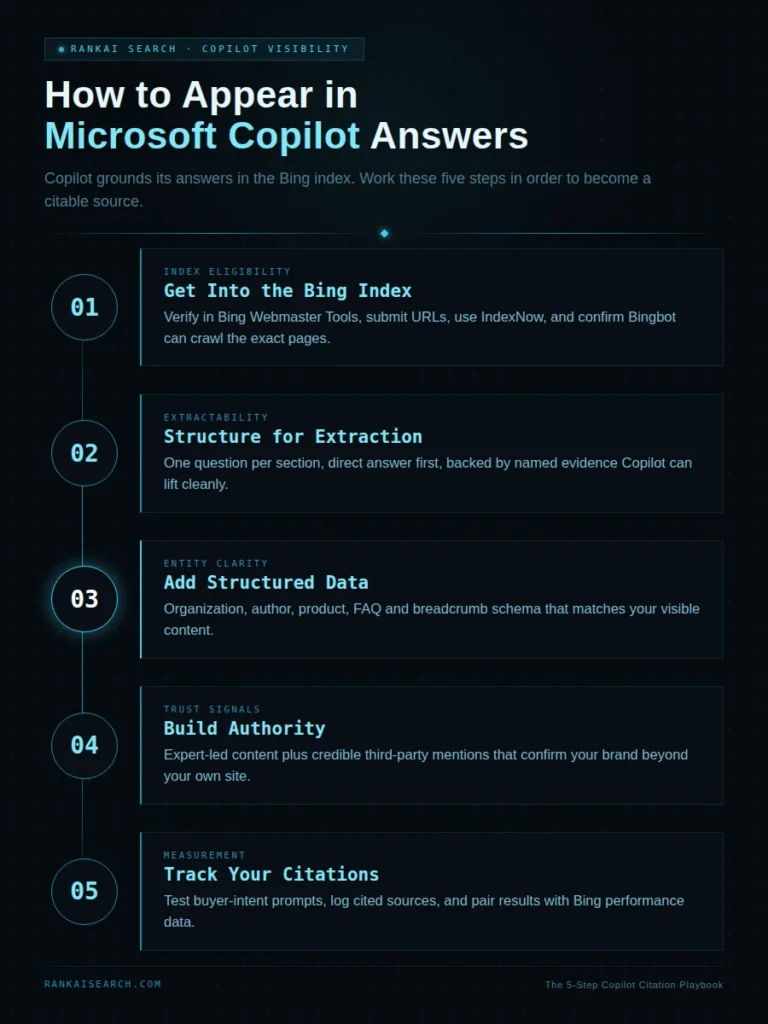
You should remember that Microsoft Copilot visibility starts with Bing, but citations require clear answers, trusted content, structured entities, and external authority. A page must be eligible, extractable, and credible before it can become a reliable source.
The practical playbook is simple:
Are You Ready to Improve Your Visibility in Microsoft Copilot?
Appearing in Microsoft Copilot answers requires strong Bing visibility, clear content, consistent brand signals, and credible authority. Improving these areas makes your business easier for Copilot to find, understand, and cite.
RankAISearch helps brands strengthen their visibility across Copilot through Bing SEO, AEO, GEO, AIO, and LLMO strategies. Explore how RankAISearch can help your brand become a trusted source in AI-generated answers.
Frequently Asked Questions About Microsoft Copilot Citations
Does Microsoft Copilot use the Bing search index?
Yes, Microsoft Copilot can use Bing web search to ground responses when web search is enabled. Microsoft states that Copilot generates a Bing query and uses results from the web to improve the response.
This means Bing visibility matters for Copilot visibility. Google-only optimization leaves a major AI search surface underdeveloped.
Do you need Bing Webmaster Tools to appear in Copilot answers?
No, Bing Webmaster Tools is not a formal requirement for appearing in Copilot answers. It is still one of the most important tools because it shows indexing, crawl, markup, and SEO issues for Bing. A site can be discovered without verification. A verified site is easier to diagnose and improve.
Can a new website appear in Microsoft Copilot?
Yes, a new website can appear in Microsoft Copilot if Bing can crawl, index, and trust its content. New sites usually need more time because they have fewer authority signals.
Start with highly specific pages that answer clear buyer questions. Then build third-party mentions and internal links to support those pages.
Does structured data guarantee a Copilot citation?
No, structured data does not guarantee a Copilot citation. It helps Bing understand your content, but citations still depend on relevance, trust, extraction, and source quality. Use structured data to clarify entities. Do not use it as a substitute for useful content.
How should you write content that Copilot can quote?
Write content that answers one question directly in the first sentence under each heading. Then support that answer with facts, examples, sources, and clear formatting. The best Copilot-ready sections are short, self-contained, and specific. They can be understood without reading the full article.
Do backlinks help your business appear in Copilot answers?
Yes, backlinks can help because they support authority and discovery. Third-party mentions also help Bing connect your brand to a topic.
Relevant links matter more than volume. A trusted industry citation can be more useful than a large number of weak links.
How long does it take to gain visibility in Microsoft Copilot?
Copilot visibility usually takes weeks to months because Bing must crawl, index, evaluate, and retrieve improved content. Faster discovery through sitemaps and IndexNow does not guarantee citation.
Track changes monthly. Prompt outputs can shift as Bing updates its index and Copilot changes source selection.
How can you check whether Copilot is citing your website?
You can check Copilot citations by running target prompts and reviewing the displayed sources when web search is used. Record the prompt, answer, cited URLs, competitors, and date.
Pair manual prompt tracking with Bing Webmaster Tools data. This shows whether the issue is citation selection, Bing indexing, or content relevance.