

How to Track AI Referral Traffic in Google Analytics
Your website may already be getting traffic from AI tools without a clean report showing it. Some visits appear under known domains like chatgpt.com or perplexity.ai, while others lose attribution completely. Tracking AI referral traffic in GA4 means looking beyond default channel names and reviewing session sources directly.
That extra detail matters for content planning. AI visitors often arrive after reading a recommendation, citation, or answer summary. This guide explains how to find visible AI referrals, group them clearly, and measure their engagement and conversions.
How Do You Track AI Referral Traffic in GA4?
To track AI referral traffic in GA4, look under Traffic acquisition and filter the session source for AI domains such as chatgpt.com, perplexity.ai, and gemini.google.com. Creating a custom segment or channel group lets you monitor AI-driven visits over time.
GA4 tracks acquisition through traffic-source dimensions such as source, medium, campaign, and default channel group. The Traffic acquisition report uses session-scoped dimensions, which makes it the best starting point for finding AI visits that happened during a specific session. (Source: Google Analytics Help, 2026)
AI referral tracking should include both automatic and manual checks. Some GA4 properties now show recognized assistant traffic as an AI Assistant channel, but source-level review still helps catch platforms that are missing, renamed, or grouped differently.
AI traffic should be measured as a distinct discovery channel. A small number of AI referrals can still influence high-intent research, comparison, product evaluation, and lead generation.
| GA4 Tracking Method | What It Shows | Best Use |
|---|---|---|
| Traffic acquisition filter | Sessions from specific AI sources | Fast manual lookup |
| Session source / medium | Source and medium for each session | Source-level AI reporting |
| Default channel group | Broad GA4 channel classification | Channel-level trend review |
| AI Assistant channel | Recognized AI assistant traffic | Baseline AI assistant reporting |
| Custom channel group | Your own AI source category | Consistent internal reporting |
| Exploration segment | AI traffic behavior | Deep analysis |
| Landing page dimension | Entry pages from AI visits | Content performance |
| Key event reporting | Valuable actions from AI users | Conversion measurement |
Where Does AI Referral Traffic Appear in GA4?
AI referral traffic can appear in GA4 under AI Assistant, Referral, Organic Search, Direct, or Unassigned. The placement depends on the source domain, referrer data, GA4 channel rules, user privacy behavior, and whether the AI platform passes a recognizable referrer.
The most reliable starting view is the Traffic acquisition report with the Session source / medium dimension. This view shows the source associated with the session, which helps separate chatgpt.com / referral from broader referral traffic.
Google’s traffic-source documentation defines source as the traffic origin, medium as the traffic method, and default channel group as the broader channel category that groups traffic sources. (Source: Google Analytics Help, 2026)
Some AI visits are easier to identify than others. A click from Perplexity may appear as a referral, while a copied link from ChatGPT may appear as direct because no referrer is passed.
| GA4 Location | Possible AI Traffic Example | What To Do |
|---|---|---|
| AI Assistant | Recognized assistant traffic | Use as a baseline channel |
| Referral | perplexity.ai / referral | Add to AI source list |
| Organic Search | Google AI surfaces tied to search | Review alongside SEO data |
| Direct | Referrer missing or stripped | Treat as hidden AI influence risk |
| Unassigned | GA4 cannot classify the source | Review source and medium values |
| Source Group | Standardized source grouping | Use for cleaner platform reporting |
| Landing page report | AI sessions by entry page | Identify pages AI users choose |
AI tracking should use multiple views. A single report can miss visits when referrer data is stripped or when GA4 classifies a source differently.
Which AI Referral Sources Should You Monitor?
You should monitor AI referral sources from major answer engines, chatbots, AI search tools, AI browsers, and assistant surfaces that can send users to your website. Start with ChatGPT, Perplexity, Gemini, Copilot, Claude, Grok, DeepSeek, Poe, You.com, and other platforms visible in your source reports.
The source list should be maintained because AI platforms change domains, apps, browser behavior, and referral patterns. A fixed list from one month can miss the next important source.
AI source monitoring should include platform families, not only one exact hostname. ChatGPT traffic may appear under different OpenAI-related sources, while Microsoft AI traffic may appear through Copilot or Bing-related surfaces.
| AI Platform | Source Values To Watch |
|---|---|
| ChatGPT | chatgpt.com, chat.openai.com, openai.com |
| Perplexity | perplexity.ai |
| Gemini | gemini.google.com, Google AI surfaces |
| Copilot | copilot.microsoft.com, Bing or Microsoft surfaces |
| Claude | claude.ai, Anthropic-related sources |
| Grok | grok.com, X AI-related sources |
| DeepSeek | deepseek.com |
| Poe | poe.com |
| You.com | you.com |
| AI browsers | Browser-specific AI referrers where visible |
How Do You Find AI Visits in the Traffic Acquisition Report?
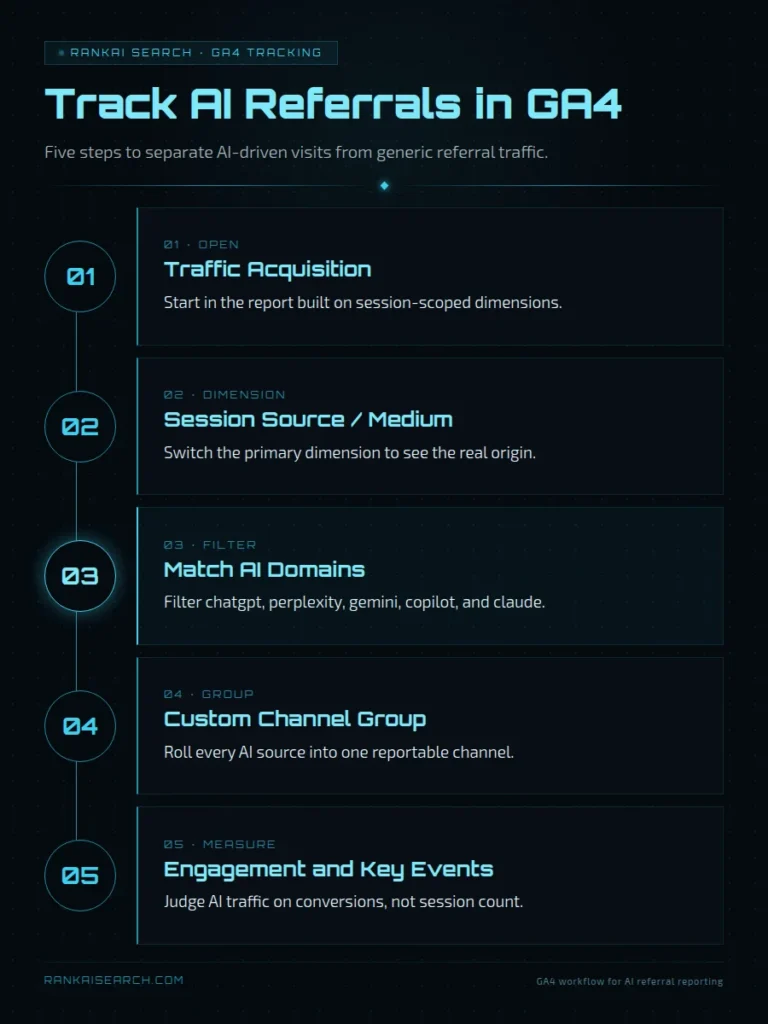
You find AI visits in the Traffic acquisition report by changing the primary dimension to Session source / medium and filtering for known AI sources. This lets you identify sessions from platforms such as ChatGPT, Perplexity, Gemini, Claude, and Copilot.
Use a date range that includes enough sessions to avoid overreading noise. AI referral volume can be small for many sites, so weekly or monthly views are often more useful than daily checks.
Google explains that the Traffic acquisition report lets users filter traffic sources and use dimensions such as Session source or Session source / medium. (Source: Google Analytics Help, 2026)
The fastest workflow is source-first. After the source is found, add landing page, campaign, device, geography, and key event metrics to understand behavior.
| Step | GA4 Action | Output |
|---|---|---|
| 1 | Go to Reports | Opens standard reporting |
| 2 | Open Acquisition | Finds traffic reports |
| 3 | Select Traffic acquisition | Shows session traffic |
| 4 | Change dimension | Use Session source / medium |
| 5 | Search AI sources | Filter chatgpt, perplexity, gemini, claude, copilot |
| 6 | Add comparison | Compare AI visits with other channels |
| 7 | Add landing page | Find entry pages |
| 8 | Review key events | Measure business value |
Use source filters before creating a permanent report. This confirms which AI sources are already sending trackable visits.
How Can You Group AI Referrals Into One GA4 Channel?
You can group AI referrals into one GA4 channel by creating a custom channel group or using GA4’s built-in AI Assistant channel where available. A custom group gives your team consistent reporting across known and emerging AI sources.
Custom grouping is useful because AI traffic may otherwise split across Referral, Direct, Organic Search, AI Assistant, and Unassigned. A custom group lets stakeholders review AI traffic without rebuilding source filters each time.
GA4 custom channel groups let users create rule-based categories of web traffic sources and use those groups in supported reports. (Source: Google Analytics Help, 2026)
A custom AI channel should not overwrite critical source detail. Keep platform-level reporting available so you can compare ChatGPT, Perplexity, Gemini, Copilot, Claude, and other sources separately.
| Grouping Option | Best Use | Limitation |
|---|---|---|
| Default AI Assistant channel | Fast baseline if available | May not cover every AI source |
| Custom channel group | Internal AI reporting standard | Requires rule maintenance |
| Exploration segment | Deeper analysis | Not always visible in standard reports |
| Looker Studio group | Dashboard reporting | Needs formula or connector setup |
| Raw source review | QA and source discovery | Not stakeholder-friendly |
Custom Channel Group Rules
Custom channel group rules define which sources belong to your AI traffic channel. The rule should include recognized AI assistant sources and any extra domains your business sees in GA4.
Put the AI channel rule above broad Referral rules when the interface requires rule order. This prevents AI referrals from being swallowed by a generic referral bucket.
| Rule Component | Recommended Setup |
|---|---|
| Channel name | AI Referral or AI Assistant |
| Dimension | Source or Session source |
| Match type | Contains or matches regex |
| Included sources | ChatGPT, Perplexity, Gemini, Claude, Copilot, Grok, DeepSeek |
| Exclusions | Internal domains and payment processors |
| Review cadence | Monthly source review |
| Owner | Analytics or SEO lead |
Source-Matching Conditions
Source-matching conditions should capture common AI domains without becoming so broad that they misclassify unrelated traffic. A clear regex or multiple contains rules is easier to maintain than vague matching.
A practical source pattern can include major assistant brand names. Review the pattern before applying it to revenue reporting.
(chatgpt|openai|perplexity|gemini|claude|anthropic|copilot|grok|deepseek|poe|you\com)
| Matching Style | Example | Risk |
|---|---|---|
| Exact match | chatgpt.com | Misses variants |
| Contains | chatgpt | Easier coverage |
| Regex | `chatgpt | perplexity |
| Source group | ChatGPT or Perplexity group | Depends on GA4 support |
| Medium rule | ai-assistant | Depends on GA4 classification |
How Do You Create an AI Traffic Segment for Deeper Analysis?
You create an AI traffic segment in GA4 Explorations by defining a session segment where the session source matches known AI domains or where the default channel group equals AI Assistant. This lets you analyze behavior beyond the standard Traffic acquisition table.
Segments help answer questions that channel reports cannot answer alone. You can compare AI visitors by landing page, device, geography, new versus returning users, engagement, and key events.
Google’s Analytics help explains that user acquisition uses first-user traffic dimensions, while traffic acquisition uses session-scoped traffic dimensions. This distinction matters because AI tracking usually needs the session that brought the visit, not only the user’s first-ever source. (Source: Google Analytics Help, 2026)
Use session segments for AI referral analysis. A user may first arrive from Google organic, then return later from ChatGPT, and the session dimension captures that later AI visit.
| Segment Setting | Recommended Choice |
|---|---|
| Segment type | Session segment |
| Include condition | Session source contains AI source |
| Alternate condition | Default channel group equals AI Assistant |
| Key dimension | Session source / medium |
| Useful breakdown | Landing page + query string |
| Useful metrics | Sessions, engagement rate, key events, revenue |
| Comparison segment | Organic Search or Referral |
Which Engagement and Conversion Metrics Should You Track?
You should track sessions, engaged sessions, engagement rate, average engagement time, landing pages, key events, revenue, lead events, and conversion quality for AI referral traffic. These metrics show whether AI traffic is only visible or actually valuable.
AI referral traffic may be smaller than organic search traffic, so quality metrics matter more than raw sessions. A low-volume AI source can still be important if it sends users to demo, pricing, product, or contact pages.
AI referral reporting should connect behavior to business outcomes. A visit from Perplexity to a pricing page has a different value from a visit to a glossary page.
| Metric | What It Measures | Why It Matters |
|---|---|---|
| Sessions | AI-driven visits | Shows traffic volume |
| Users | People visiting from AI sources | Shows reach |
| Engaged sessions | Sessions with meaningful engagement | Shows visit quality |
| Engagement rate | Share of engaged sessions | Compares channel quality |
| Average engagement time | Active user attention | Shows content fit |
| Landing page | First page in the session | Shows which pages AI sends users to |
| Key events | Important business actions | Shows lead or sale activity |
| Total revenue | Purchase and revenue value | Shows commercial impact |
Engagement and Landing-Page Performance
Engagement and landing-page performance show whether AI visitors find the page useful after clicking. A strong AI landing page should match the prompt context that likely sent the visitor.
| Landing Page Signal | What To Diagnose |
|---|---|
| High sessions | AI tools often send users there |
| High engagement | Page matches user intent |
| Low engagement | AI context may not match page promise |
| High key events | Page supports conversion |
| High exits | Page may need stronger next steps |
| Source concentration | One AI platform favors the page |
| Prompt alignment | Page answers AI-style questions |
Leads, Sales, and Revenue
Leads, sales, and revenue show whether AI referral traffic supports business outcomes. AI traffic should be judged by the actions that matter to the company, not only by session count.
| Business Model | AI Traffic Outcome To Track |
|---|---|
| SaaS | Demo requests, trials, pricing views |
| Ecommerce | Purchases, add-to-cart events, revenue |
| Professional services | Contact forms, booked calls, lead quality |
| Publisher | Engaged sessions, newsletter signups |
| Local business | Calls, directions, bookings |
| B2B | Pipeline creation, content downloads, form fills |
How Can You Identify Which Pages Attract AI Visitors?
You can identify pages that attract AI visitors by combining an AI source segment with landing page, page path, and key event metrics. This shows which pages AI tools send users to and whether those pages convert.
AI visitors often enter through pages that answer specific questions. These can include comparison pages, definition pages, product pages, pricing pages, integration pages, documentation, and long-form guides.
The page-level view helps prioritize content updates. A page that already receives AI visits should be checked for clarity, citations, calls to action, and conversion paths.
| Page Type | Why AI Visitors May Arrive |
|---|---|
| Definition page | AI answer references a clear explanation |
| Comparison page | User clicks after evaluating options |
| Product page | AI recommends or describes a product |
| Pricing page | User needs cost confirmation |
| Integration page | User checks compatibility |
| Documentation | User needs setup details |
| Case study | User wants proof |
| Blog guide | AI cites educational content |
Why Might Some AI Visits Appear as Direct or Unassigned Traffic?
Some AI visits appear as Direct or Unassigned because GA4 does not always receive a clear referral source. Referrers can be stripped by apps, browsers, privacy settings, copy-paste behavior, redirects, and some AI interfaces.
GA4 defines (direct) / (none) as traffic that does not have a clear referral source. This means AI influence can be undercounted when the click does not pass usable source data. (Source: Google Analytics Help, 2026)
Unassigned traffic appears when Analytics cannot categorize the source into a channel. This can happen when source and medium values are missing, unusual, or inconsistent.
AI referral reports should include a limitation note. GA4 can track visible AI referrals, but it cannot identify every AI-influenced visit.
| Hidden AI Traffic Cause | GA4 Result |
|---|---|
| User copies and pastes URL | Direct |
| AI app strips referrer | Direct |
| Browser blocks referrer | Direct or unassigned |
| Redirect removes source | Direct |
| Source not recognized | Referral or unassigned |
| App opens in webview | Inconsistent source |
| User returns later | Direct or branded search |
| Offline influence | No GA4 source |
Use supporting signals to estimate hidden influence. Watch branded search, direct traffic to AI-cited pages, sales feedback, and self-reported attribution.
How Should You Compare AI Referrals With Other Traffic Channels?
You should compare AI referrals with Organic Search, Referral, Paid Search, Email, Social, Direct, and branded traffic using engagement, conversion rate, revenue, and landing-page intent. AI traffic should be judged by quality and role, not only by volume.
AI referrals may perform differently because users arrive after reading an answer, comparison, or recommendation. The user may be more informed before the first pageview.
Channel comparison should use the same date range and landing-page class. Comparing AI visits to all organic visits can be misleading if AI traffic mostly lands on pricing or product pages.
| Comparison Metric | Why It Matters |
|---|---|
| Sessions | Shows channel scale |
| Engagement rate | Shows session quality |
| Average engagement time | Shows depth of attention |
| Landing page mix | Explains intent differences |
| Key event rate | Shows action quality |
| Revenue per session | Shows commercial value |
| Assisted conversions | Shows indirect influence |
| New users | Shows audience expansion |
Use AI traffic as a separate line in monthly reporting. Do not bury it inside generic referral traffic once it becomes visible.
How Can You Build a Repeatable AI Referral Report?
You can build a repeatable AI referral report by standardizing source rules, saving a GA4 exploration, creating a custom channel group, adding landing-page and conversion views, and exporting the results to a dashboard. The report should be easy to update every month.
A repeatable report prevents one-off analysis from becoming inconsistent. It also helps teams notice when new AI platforms begin sending traffic. A useful AI referral report should show source, landing page, engagement, key events, revenue, and trend direction. It should also include notes about attribution gaps.
| Report Component | What To Include |
|---|---|
| Source summary | Sessions by AI platform |
| Channel trend | AI traffic over time |
| Landing pages | Entry pages by AI source |
| Engagement | Engagement rate and time |
| Key events | Leads, sales, signups, or bookings |
| Revenue | Ecommerce or attributed value |
| Comparison | Organic, Referral, Direct, and Paid |
| Notes | Tracking gaps and source changes |
Which GA4 Tracking Mistakes Can Distort Your Results?
GA4 tracking mistakes that distort AI referral reporting include using the wrong source scope, relying only on default channels, missing source variants, ignoring Direct traffic, mixing user and session dimensions, and tracking sessions without key events. These mistakes can overstate or understate AI performance.
The most common mistake is treating AI referral traffic as one clean channel. In practice, AI traffic can split across multiple sources and channels.
Google’s tagging best practices explain that direct, unassigned, and not set issues can occur when traffic-source data is missing, inconsistent, or not categorized. (Source: Google Analytics Help, 2026)
AI tracking should be documented. A report without source rules, date ranges, and known limitations is hard to compare over time.
| Mistake | Better Practice |
|---|---|
| Use only Default channel group | Also review Session source / medium |
| Track only ChatGPT | Include Gemini, Perplexity, Claude, Copilot, and others |
| Ignore Direct | Note hidden AI influence risk |
| Use first-user source only | Use session source for visit-level analysis |
| Skip landing pages | Identify which pages AI users enter |
| Count sessions only | Track engagement and key events |
| Never update regex | Review new AI sources monthly |
| Mix test traffic | Exclude internal visits |
Avoid treating AI referral data as complete. GA4 measures visible referral paths, not every AI-assisted decision.
What Should You Remember About Tracking AI Referral Traffic in GA4?
You should remember that GA4 can track visible AI referrals, but it cannot capture every AI-influenced visit. The strongest setup combines Traffic acquisition filters, AI source lists, custom channel groups, session segments, landing-page analysis, and conversion measurement.
| Principle | Practical Action |
|---|---|
| Use session source | Track the visit that came from AI |
| Group sources | Build a reusable AI channel view |
| Keep source detail | Compare platforms separately |
| Track landing pages | Find AI-attracting content |
| Measure key events | Connect AI visits to business value |
| Watch Direct | Document hidden attribution risk |
| Update source lists | Add new AI domains regularly |
| Compare channels | Judge AI traffic by quality and outcomes |
AI referral tracking should mature with AI adoption. Start with source filters, then build reporting that connects AI traffic to revenue, pipeline, and content strategy.
Are You Ready to Understand the Business Value of Your AI Traffic?
AI referral traffic becomes more meaningful when you connect each visit to its source, landing page, engagement level, and conversion outcome. A clear reporting setup helps reveal which AI platforms are creating awareness and which are sending visitors who are ready to compare, contact, subscribe, or buy.
RankAISearch can help organize scattered referral data into a practical measurement framework. This includes grouping AI sources, identifying high-performing landing pages, tracking key events, and accounting for attribution gaps caused by Direct or Unassigned traffic.
Start a conversation with RankAISearch to create a clearer view of how AI referral traffic contributes to your content performance, leads, and revenue.
Frequently Asked Questions About Tracking AI Referral Traffic in GA4
Can GA4 automatically identify traffic from AI tools?
GA4 can automatically identify some AI assistant traffic when the source is recognized and referrer data is available. It may not identify every AI-driven visit. Manual source monitoring is still needed. AI platforms can use different domains, app flows, browsers, and referrer behavior.
Which GA4 dimension should you use to find AI referrals?
Use Session source or Session source / medium to find AI referrals in GA4. These dimensions show where a specific session came from. Avoid relying only on first-user dimensions for AI traffic. A user may first arrive from another channel and later return through an AI tool.
What source does ChatGPT traffic show in GA4?
ChatGPT traffic may show as chatgpt.com, chat.openai.com, openai.com, AI Assistant, Referral, Direct, or another related source value. The exact value depends on the click path and GA4 classification. Review both source and channel. This helps catch ChatGPT visits that are not grouped cleanly.
Why does some AI traffic appear as direct traffic?
Some AI traffic appears as Direct because GA4 does not receive a usable referrer. This can happen when users copy and paste links, use apps that strip referrers, or move through privacy-protective browser paths. Direct traffic can include hidden AI influence. Use self-reported attribution, branded search trends, and landing-page patterns to support the analysis.
Should AI referrals have their own custom channel group?
Yes, AI referrals should have their own custom channel group when they matter to reporting. A custom group makes AI traffic easier to compare with Organic Search, Referral, Paid Search, Email, and Direct. Keep source-level detail available. The channel group should simplify reporting without hiding platform differences.
Can you see which AI answer sent a visitor to your site?
GA4 usually cannot show the exact AI answer or prompt that sent a visitor to your site. It can show the source, landing page, engagement, and conversion behavior when referral data exists. Use prompt testing to fill the gap. Test likely prompts in AI tools and compare cited pages with GA4 landing pages.
How often should you update your list of AI referral domains?
Update your AI referral domain list at least monthly. Review it sooner if a new AI platform, browser, or assistant begins appearing in your source reports. Add new domains only after QA. A broad rule can accidentally classify unrelated sources as AI traffic.
How can you measure conversions generated by AI referral traffic?
Measure conversions from AI referral traffic by applying an AI traffic segment and reviewing key events, revenue, ecommerce purchases, form submissions, bookings, and demo requests. Use session-scoped source dimensions for visit-level conversion analysis. Compare AI conversion quality with other channels. Look at key event rate, revenue per session, lead quality, and landing-page intent.